
The new Router mode in llama cpp server
Dynamically load, unload, and switch models without restarting

What Router Mode Is
Router mode is a new way to run the llama cpp server that lets you manage multiple AI models at the same time without restarting the server each time you switch or load a model.
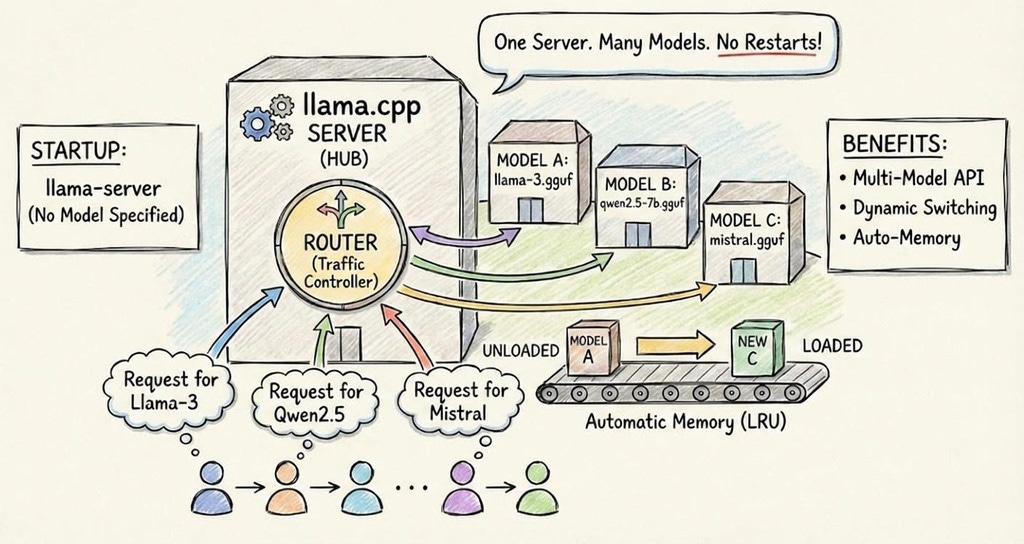
Previously, you had to start a new server process per model. Router mode changes that.
This update brings Ollama-like functionality to the lightweight llama cpp server.
🎖Prompt Engineering Techniques Hub
A GitHub repo with implementations of 25+ prompt engineering techniques.
Knowledge of prompt engineering techniques is essential for anyone (AI Engineers, Data Scientists, ML Engineers etc.) working with LLMs.
Why It Matters
Imagine you want to try different models like a small one for basic chat and a larger one for complex tasks. Normally:
You’d start one server per model.
Each one uses its own memory and port.
Switching models means stopping/starting things.
With router mode:
One server stays running.
You can load/unload models on demand
You tell the server which model to use per request
It automatically routes the request to the right model internally
Saves memory and makes “swapping models” easy
A Simple Example
Step 1: Start llama.cpp server in router mode
llama-server(No --model flag — that tells it “router mode”).
Step 2: Ask it to use a particular model
curl http://localhost:8080/v1/chat/completions \
  -H “Content-Type: application/json” \
  -d ‘{
    “model”: “my-cool-model-v1-GGUF”,
    “messages”: [{”role”: “user”, “content”: “Hello!”}]
  }’
The server:
Sees the
“model”field.Loads that model on the fly (first time).
Routes your chat request to it.
Returns the answer — all in one go!
What You Can Do With It
List all available models.
Load a model manually.
Unload a model (free memory).
Send requests to different models without restarting the server.
Let the server manage memory via LRU (least-recently-used) eviction when many models are loaded.
Why It’s Helpful
No more multiple servers: One server can handle many models.
Switching is easy: Just specify
“model”: “…”.Better resource use: Only loads a model when needed.
Good for testing and apps: You can try different models in one place.
When Router Mode Is Most Useful
Testing multiple GGUF models
Building local OpenAI-compatible APIs
Switching between small and large models dynamically
Running demos without restarting servers
Reference
[1] https://huggingface.co/blog/ggml-org/model-management-in-llamacpp
Great breakdown of the router mode functionality. The LRU eviction strategy for memory managment is paricularly clever for production setups where you cant predict which models will be needed. I've been running into similar challenges with model swapping latencies, and being able to keep commonly used models warm while automaticly freeing up space seems like a solid tradeoff. This could realy simplify multi-model serving without the overhed of orchestration tools.
Amazing augmentation for the good 😊